







What do I need to do before throwing away old tech?
Our devices store so much personal information about us. So when it’s time to throw them away, how can we make sure they’re wiped clean?
Windows 10 support is due to expire in October and devices past this “best-before date” will not receive any fixes for new security issues.
Wayne Angus, country manager for IT asset lifecycle management company Greenbox, says this poses “a potential ticking time bomb”, with an estimated 240 million PCs globally no longer able to be used securely after October.
He describes e-waste as “one of New Zealand's most underappreciated security environmental threats”, with Kiwis producing an estimated 80 million kilograms annually.
People underestimate the cyber security risk associated with how they dispose of their old phones and laptops
Greenbox country manager Wayne Angus says people underestimate the cyber security risk associated with how they dispose of their old phones and laptops.
Urban Miners salvaging electronic waste from landfill
“The major challenge is around the data and the security of data because the cyber hackers and the underbelly out there in the world are very, very clever at extracting information and data from disposed of devices,” Angus told Nine to Noon.
For those replacing their old tech or people simply wanting an upgrade, there are some key factors to consider before getting rid of your device.
Can people access my files if I’ve deleted them or factory reset?
===================================================
AUT department of computer and information sciences head Minh Nguyen says think of files like books.
“All [a factory reset] does is just clear off all the data of username, password, and the table, but all your books are still there. The book is only labelled ‘deleted’, but the written text inside the book is still there.”
Some Apple and Android phones automatically ‘encrypt’ data. This means a ‘key’ acts as a password, so your data cannot be read without it, he says. Performing a factory reset on these phones deletes that encryption key.
Using the ‘quick format’ tool on laptops and PCs also leaves behind traces, Nguyen says. That’s why the ‘full format’ option is slower, he says, it works by opening every page in that book and removing all traces.
“However, still, if you think about it in real life, they still leave some marks. People with some [high-level] tools, they still can recover whatever you deleted by the eraser. So even full format, sometimes it's not 100 percent safe.”
How far do you really need to go?
==========================
Physically destroying CDs may be your best bet, Nguyen says. But for things like laptops, high-level software is available for deep data erasure on devices if there's sensitive information.123RF
If you’ve got super important data, you could go to a certified IT asset disposal company which will take your device back to the bare bones, Angus says.
“[Cyber criminals will] spend hours fiddling through a hard drive just to try and find that one bit of information that they might be able to use to get access to your corporate database or get into your network through a password.”
Alternatively, you could follow the guide from e-waste service TechCollect on how to use this high-level software. But Nguyen says if you haven’t stored sensitive data on your device, you could resort to the steps below.
“[Doing a data erasure] might take a few hours to wipe off one, and most people might not bother to do that.”
The steps you can take
===================
The National Cyber Security Centre recommends starting with backing up your files to a Cloud service or a storage device.
Smartphones / tablets: Nguyen says encrypt your data (you can usually find the steps on your manufacturer’s website), sign out of all your accounts, perform a factory reset (instructions should also be on your manufacturer’s website), and remove any SIM or SD card. “Whatever data left inside the phone is encrypted, and it's very, very difficult to decrypt.”
Smartwatch: Firstly, unpair it from your phone, perform a factory reset then remove any SIM card. “It should be safe because once you unpair from your phone then you don't have much data left. After you [do a] factory reset, I think it goes to the brand new condition.”
Gaming consoles / smart TVs: Log out and perform a factory reset. Don’t forget to remove any USB or SD cards plugged in.
Laptops / PCs: Encrypt the hard drive disk and do a full format (which you can find the tool for by searching in your settings). You can then physically remove the hard drive as an extra security measure. Nguyen notes most people are saving data on to their Cloud storage, so that’s where the increasing security risk is. Similarly, performing a full format on a USB or external hard drive removes data more than just deleting.
Modem: Modems store your password and some DNS and VPN settings. Nguyen recommends starting with a factory reset. There’s usually a tiny hole which you can press using a pin or paper clip for about 10 to 30 seconds to do this. This will reset your password and admin username to the default (both ‘admin’). Access the admin page by going to ‘192.168.1.1’ on your web browser. Login using the default admin username and password and “just change the admin password to be whatever you don't even remember”.
The back of a modem with two wires plugged in.
Modems have internal memory storages that holds data on your Wi-Fi, IP address and admin username and password.Unsplash / Stephen Phillips
DVDs / CDs / SIM cards: It’s best to physically destroy these by cutting or breaking them, Nguyen says.
Cameras: Perform a factory reset and format the internal hard drive along with the external SD card.
Don't leave old devices lying around
=============================
Lithium-ion batteries also have an end of life. If left inside devices, they can swell and become a fire risk, Angus says.
“If you've got a device like a phone or a laptop, and you notice that the back of the device where the battery is hidden away on the inside is starting to bulge, then you've got a real risk and you need to make sure that you get that dealt with properly.”
What are my options for disposal?
============================
Check your local council for more information about e-waste collection services in your area.
TechCollect is a free service that offers e-waste drop-off collection points across the country for households and small businesses. They encourage people with working devices to contact the Recycle A Device programme – a not-for-profit organisation who collect and refurbish old laptops and tablets which are then given to people who need them.
====================================================

The Gospel’s Relevance Today**
The Gospel, meaning ‘good news’, is the cornerstone of the message contained in the Bible’s first four books—Matthew, Mark, Luke, and John. While these records were written approximately 2,000 years ago, a natural question arises: why is this Gospel still relevant and vital for us today? This analysis seeks to explore what the Bible itself defines as the Gospel and to understand its enduring significance.
**Defining the Gospel: Core Biblical References**
The Gospel is not a vague concept; Scripture provides clear descriptions of its content and focus.
* **The Gospel of the Kingdom:** In Matthew 4:23, as Jesus begins his ministry, he is described as “preaching the gospel of the kingdom.” This immediately establishes that the good news is centrally about a kingdom—the Kingdom of God. His accompanying miracles served to validate the authority of this message.
* **The Gospel of Jesus Christ:** Mark 1:1 opens with, “The beginning of the gospel of Jesus Christ, the Son of God.” Here, “Christ” is a title meaning ‘anointed one’. Thus, the good news is intrinsically about Jesus: his identity as the Anointed One and his unique status as the Son of God.
* **The Gospel of God’s Grace:** In Acts 20:24, the Apostle Paul speaks of his mission to “testify the gospel of the grace of God.” Grace signifies an undeserved gift. This reveals that the Gospel involves a gift from God, offered not because it is merited, but out of His benevolence.
* **The Gospel of Salvation and Peace:** Romans 1:16 declares the Gospel is “the power of God to salvation for everyone who believes,” breaking down barriers between Jew and Gentile (Greek). Furthermore, Romans 10:15 calls it the “gospel of peace,” pointing to a future state of peace brought about by this message.
* **The Gospel Summarised:** 1 Corinthians 15:1-4 provides a foundational summary. Paul reminds believers of the gospel he preached, “by which also you are saved.” He then states its core historical facts: “that Christ died for our sins according to the Scriptures, and that He was buried, and that He rose again the third day according to the Scriptures.” The Gospel is therefore rooted in the sacrificial death and resurrection of Jesus.
In synthesis, the Gospel is the good news of **salvation and future peace in the Kingdom of God**, made possible by **the grace of God** and **the obedient sacrifice of His Son, Jesus Christ**, and offered to all who believe.
**Old Testament Foundations: The Gospel Preached to Abraham**
A crucial question is whether the Gospel is confined to the New Testament. Scripture shows its foundations were laid much earlier. Galatians 3:8 states explicitly that “the Scripture, foreseeing that God would justify the Gentiles by faith, preached the gospel to Abraham beforehand, saying, ‘In you all the nations shall be blessed.’”
This reference points back to Genesis 12:1-3, where God made profound promises to Abraham: to make him a great nation, to bless those who blessed him, and that “in you all the families of the earth shall be blessed.” These promises—later reaffirmed to Isaac and Jacob—form the bedrock of the Gospel hope. The good news of salvation through Christ is the fulfillment of how **all nations** would be blessed through Abraham’s “seed.”
**The Gospel’s Personal Relevance: Good News for You Today**
How does this ancient message become “good news for you” today? The application is clearly outlined in Galatians 3.
* **Access through Faith in Christ:** Galatians 3:26 declares, “For you are all sons of God through faith in Christ Jesus.” The promise made to Abraham is now extended to anyone with faith in Jesus.
* **The Role of Baptism:** Verse 27 explains, “For as many of you as were baptized into Christ have put on Christ.” Baptism is the God-appointed act of faith that identifies a believer with Christ’s death and resurrection.
* **Unity and Inheritance:** Verses 28-29 reveal the glorious outcome: “There is neither Jew nor Greek, there is neither slave nor free, there is neither male nor female; for you are all one in Christ Jesus. And if you are Christ’s, then you are Abraham’s seed, and heirs according to the promise.” Through the Gospel, all barriers are removed; believers become spiritual descendants of Abraham and heirs to the promises of the Kingdom.
This Gospel was once a mystery hidden in God’s purpose (Ephesians 3:3-9). Now, it has been revealed: the unsearchable riches of Christ, offering salvation to all who heed the call, believe the message, and are baptised into him.
**Conclusion: An Enduring and Open Invitation**
The Gospel is far more than a historical account; it is the living, powerful good news of God’s plan for salvation. It is rooted in promises to Abraham, accomplished through the death and resurrection of Jesus Christ, and open to all people without distinction. It offers a tangible hope—the hope of resurrection, peace, and an inheritance in the coming Kingdom of God. This is why the Gospel remains profoundly relevant. It is an invitation to listen, believe, and stand firm in this hope, linking our lives today to the eternal purpose of God.


Poll: 🤖 What skills do you think give a CV the ultimate edge in a robot-filled workplace?
The Reserve Bank has shared some pretty blunt advice: there’s no such thing as a “safe” job anymore 🛟😑
Robots are stepping into repetitive roles in factories, plants and warehouses. AI is taking care of the admin tasks that once filled many mid-level office jobs.
We want to know: As the world evolves, what skills do you think give a CV the ultimate edge in a robot-filled workplace?
Want to read more? The Press has you covered!
-
52.5% Human-centred experience and communication
-
14.8% Critical thinking
-
29.6% Resilience and adaptability
-
3.1% Other - I will share below!
Room for rent
🌿 Beautiful Private Space Available for Rent – Perfect for 2 Girls or a Couple 🌿
Located in the peaceful and family-friendly suburb of Lynfield, this warm and welcoming home offers a comfortable living space in a highly sought-after top school zone.
✨ What’s Included:
🏡 2 Spacious Bedrooms
🛁 Private Bathroom
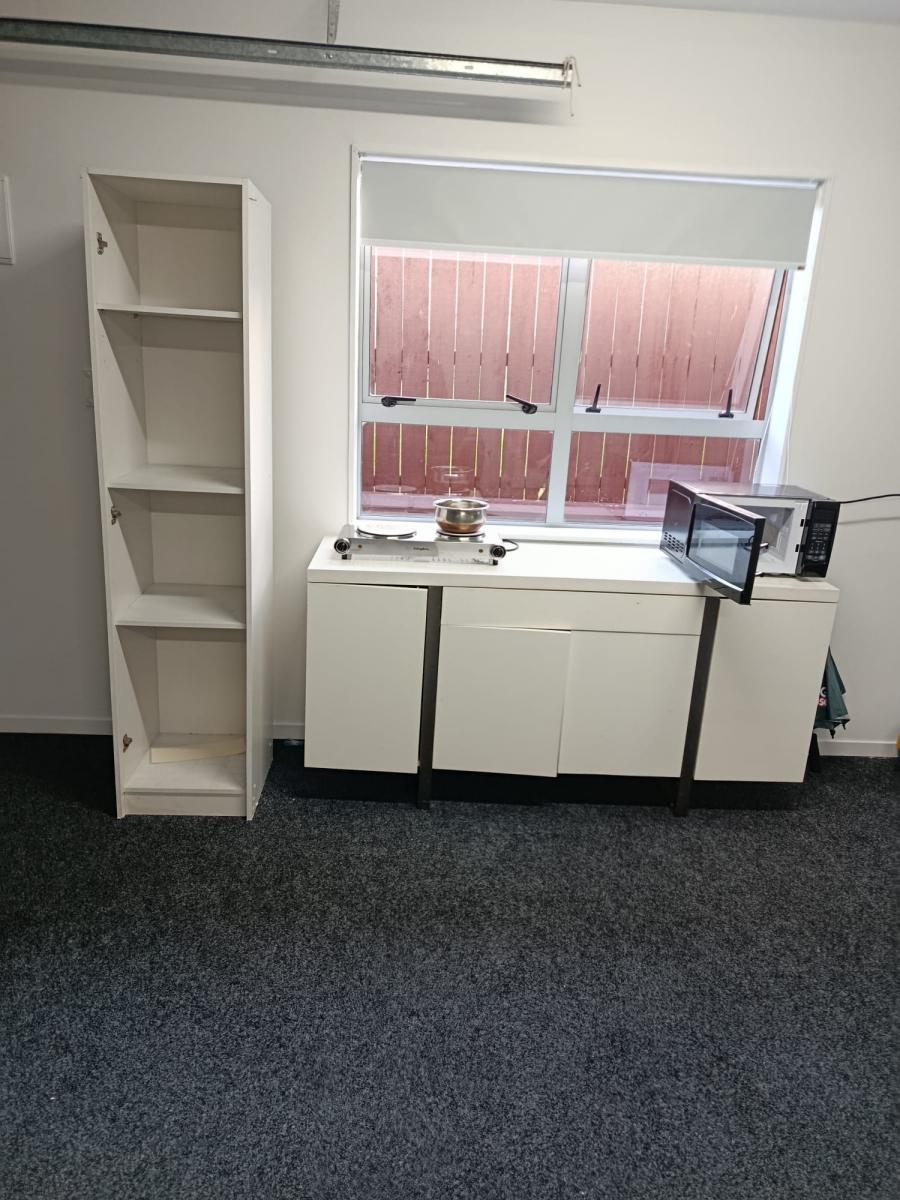
🍳 Separate Kitchen
🛏️ 1 Bed with Mattress
🔥 Stove
📟 Microwave
Unlimited WiFi included
✔ Power & water included
✔ Bus stop in front of the house
✔ Nearby shops and supermarkets
This setup is ideal for two girls or a couple looking for a quiet, safe, and relaxed place to call home.
🌸 Enjoy living in a serene neighbourhood with a friendly community atmosphere, while still being conveniently close to schools, shops, and transport.
If you're looking for comfort, privacy, and a peaceful lifestyle — this could be your perfect new home 💛
📍 Location: Lynfield, Auckland
📩 Message for more details or to arrange a viewing. For couple $450 for one bedroom. $600 for the 2 bedroom and kitchen and bathroom. Feel free to contact me on 022-422-0145 for any other details













 Loading…