






Neighbourly New Year Tip #10 - Save posts
Have you spotted a post on Neighbourly you want to refer back to later? It's easy to save posts such as a recommendation for a good plumber or restaurant, something you're thinking of buying or a poll you'd like to track.
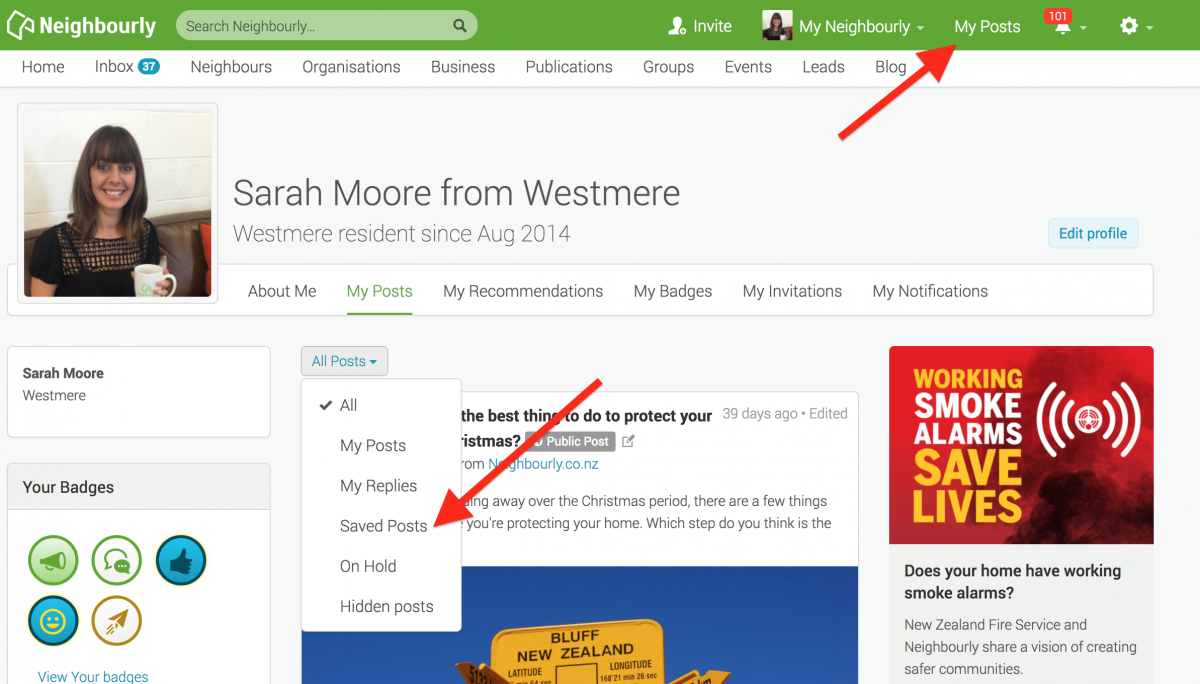
Here's how to save and find posts:
1) Simply click on the SAVE button at the bottom right of a post you want to locate later. The button will change to 'Saved!'
2) To find the post, click on My Posts in the top green navigation bar (on desktop) and click on the All Posts dropdown menu. You'll see the option 'Saved Posts'
3) When you no longer need a record of the post, just click on the Saved button and it will disappear from your Saved list.
Poll: Should the government levy industries that contribute to financial hardship?
As reported in the Post, there’s a $30 million funding gap in financial mentoring. This has led to services closing and mentors stepping in unpaid just to keep helping people in need 🪙💰🪙
One proposed solution? Small levies on industries that profit from financial hardship — like banks, casinos, and similar companies.
So we want to hear what you think:
Should the government ask these industries to contribute?

-
59.5% Yes, supporting people is important!
-
26.2% No, individuals should take responsibility
-
14.3% ... It is complicated

Fundraining for Bowl Cancer
Hi,
This February, I am taking part in Move your Butt for Bowel Cancer and will be conquering 200km for the 100 Kiwis who die from bowel cancer every month.
My goal is to raise funds for Bowel Cancer NZ to support patients, raise awareness and fund research to beat bowel cancer.
Please sponsor my challenge and support my efforts to save Kiwi lives.
To make a donation, simply visit my personal fundraising page below:
www.moveyourbutt.org.nz...
Thanks so much for your support.
Roydon
Poll: Could having a bigger university presence bring new opportunities and energy to the Bay of Plenty?
As reported in The Post, the University of Waikato is planting roots in Tauranga as it works on “ambitious plans” to grow its Durham St campus. The goal? To see Tauranga recognised as a true “university city.”
We want to know: Could having a bigger university presence bring new opportunities and energy to the region? We’d love to hear your thoughts!

-
64.3% Yes!
-
21.4% Nah
-
14.3% Mmm, let's wait and see
 Loading…